Choose a class
Read the class description and starting ability on the character screen. A different class changes how your opening minutes feel.
Choose a class and zone, then keep moving as enemies close in. Your abilities cast automatically while you guide the hero and shape the run with upgrade cards.
Play the game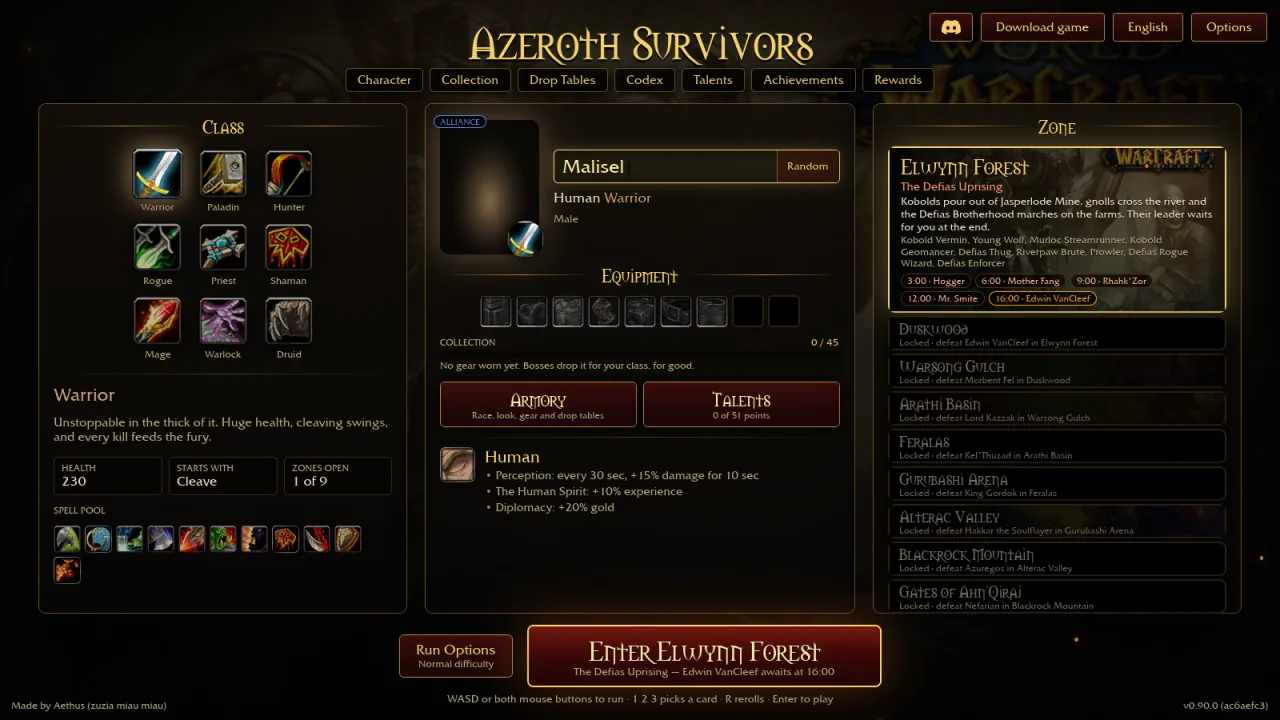
Press play to load the supplied Azeroth Survivors build. The first download is large and a WebGPU-capable browser is needed.
These captures show the class picker, the first steps in Elwynn Forest, combat, and a level-up choice.
Real Azeroth Survivors captures from Azeroth Survivors guide, labelled there as build v0.90.0. The supplied embedded build can look different after updates. Game visuals belong to their respective owners.
The hero's abilities cast on their own. Focus on movement, space, and the next upgrade choice.
Read the class description and starting ability on the character screen. A different class changes how your opening minutes feel.
Choose an available area, such as Elwynn Forest, then press Enter or the large enter button to begin.
Use WASD to guide the hero while spells fire automatically. Leave room to pass around approaching enemies.
At level-up, read the three cards and press 1, 2, or 3 to choose. The current menu also shows R to reroll.
Use your first run to learn the class's starting spell and the rhythm of the zone.
Choose a route with open ground ahead of you. Let enemies trail behind, then circle back for rewards when the path is clear.
Compare the exact change shown on the upgrade cards. Strengthening a reliable spell can make it easier to keep a route open.
The zone timer tells you when the next boss approaches. Keep your health and movement options in mind as that moment gets close.
The supplied iframe uses a separate host. Controls and flow were cross-checked against the original game site and the documented game captures; menu details may change by build. PokéBonk.lol is an independent fan guide.